
Difference Between An Input And Output Device
Hey there, tech explorer! Ever feel like your computer is speaking a foreign language? Or maybe you're trying to get it to understand your language? Well, let's decode that mystery together. Today, we're diving into the super simple, yet super important, world of input and output devices. Think of it as the ultimate cheat sheet for understanding how you talk to your gadgets, and how they talk back to you!
So, what's the big deal? It's really just about how information flows. Imagine your computer as a brilliant but slightly socially awkward friend. You need to tell them what to do, and sometimes, they need to show you what they've done. That's where our dynamic duo, input and output devices, come in!
Let's start with the grand entrance: Input Devices. These are the guys that let you, the awesome human, send information into the computer. They’re your trusty messengers, carrying your thoughts, commands, and even your doodles into the digital realm. Without them, your computer would just be a fancy paperweight, a very expensive and probably blinking paperweight, but a paperweight nonetheless!
Think about it. How do you tell your computer to open your favorite cat video website? You don't just stare at it expectantly (though I've tried, it doesn't work, trust me). You use something. And that 'something' is an input device!
The Superstar Input Devices
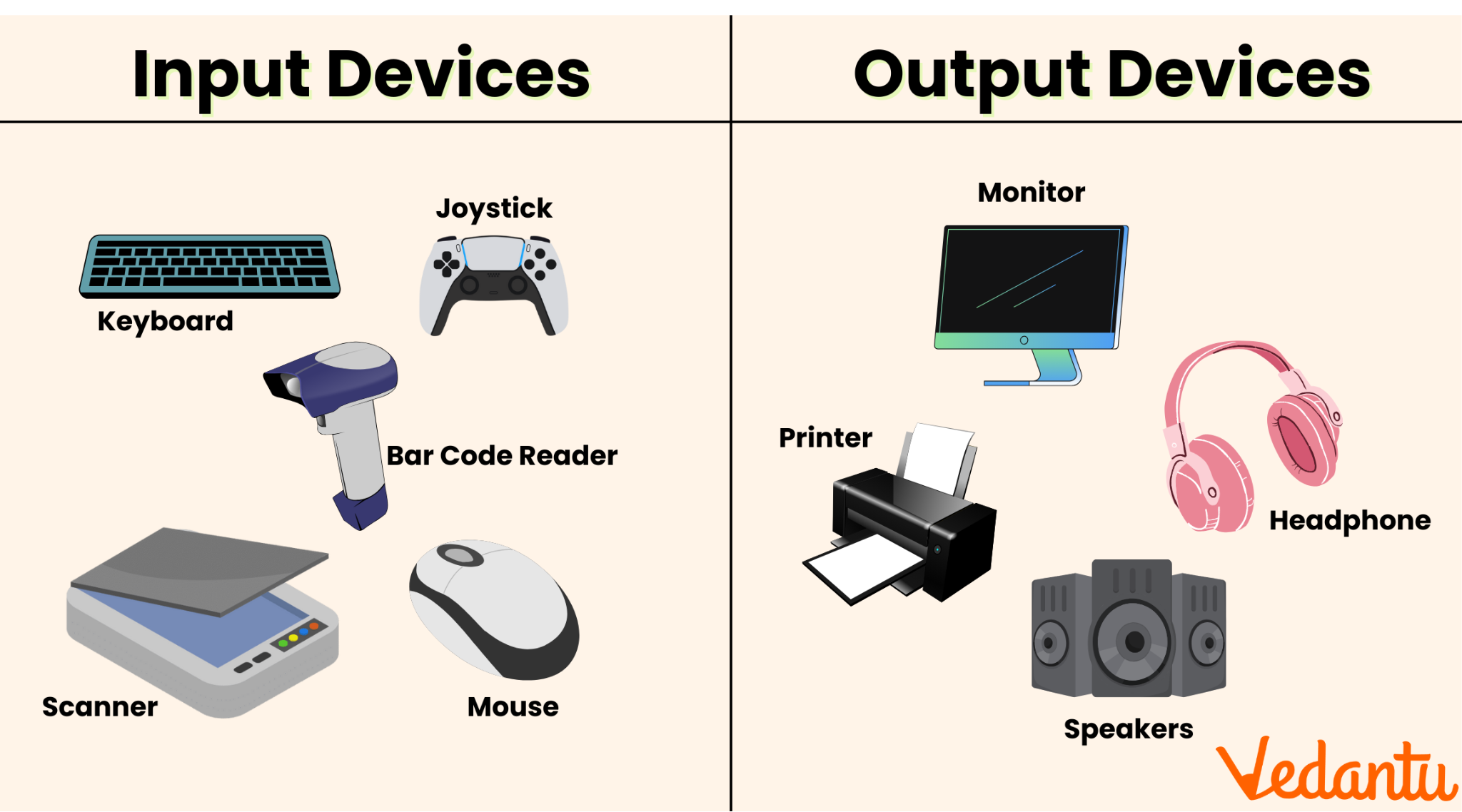
The most common hero in this story is probably the keyboard. Yup, that thing with all the tiny buttons that you probably have some sort of love-hate relationship with. Love it because it lets you type out your magnum opus (or your grocery list), hate it when you accidentally hit Caps Lock for the tenth time. Classic keyboard move, right?
When you press a key, you’re sending a little digital signal into the computer. 'A' means 'A', 'B' means 'B', and 'Ctrl+Alt+Delete' means 'HELP ME, I'VE ACCIDENTALLY OPENED 50 TABS AGAIN!'. It’s a direct line from your brain to the processor, which is pretty darn cool when you think about it.
Then we have the ever-so-sleek mouse. Ah, the mouse. The digital pointer that lets you navigate the wild west of your desktop. Clicking, dragging, scrolling… it’s like giving your computer little digital pats or shoves to get its attention. You’re essentially telling it, "Hey, pay attention to this icon!" or "Move that file over there, you digital squirrel!"
It translates your hand movements into cursor movements on the screen. So, the next time you’re furiously clicking away, know that you’re engaged in a sophisticated dance of digital diplomacy. You’re the choreographer, and the mouse is your tiny, wheeled ballet dancer.

But wait, there’s more! What about when you want to get a little more artistic? Enter the graphics tablet and stylus. For all you budding artists or those who just like to doodle wildly, these are your digital paintbrushes. You draw on the tablet, and your strokes appear on the screen. It’s like magic, but with a bit more technology involved. No muddy brushes or paint stains to worry about!
And let's not forget about microphones! Ever wanted to tell your virtual assistant to play your favorite song? Or record your epic podcast? That's the microphone doing its thing. It takes your voice, your beautiful, unique voice, and turns it into data the computer can understand. So, go ahead and sing your heart out, or just demand that your smart speaker play some disco. The mic is listening!
How about those times you need to get physical documents into your computer? That's where the trusty scanner comes in. It takes a piece of paper, a photo, or even a really cool drawing you made, and turns it into a digital image. It's like giving your paper a digital twin. Pretty neat, huh?
And what about touching screens? Yep, those are input devices too! Touchscreens on your phone, tablet, or even some laptops allow you to interact directly with the display. A tap, a swipe, a pinch – you’re sending commands straight to the device with your fingertips. It’s the most direct form of communication, making your device feel like an extension of yourself. Just try not to smudge the screen too much, okay? It makes the output look a bit… artistic.
There are also more specialized input devices, like joysticks and game controllers for all you hardcore gamers out there. They allow for more nuanced and rapid control in games, making you feel like you’re actually piloting that spaceship or scoring that winning goal. They translate your button presses and stick movements into precise in-game actions. Get ready for victory!
Basically, any device that lets you feed information into the computer is an input device. It's the gateway for your commands, your creativity, and your demands. Think of it as the computer’s ears and hands, receiving all the good stuff you send its way.
Now, Let's Hear What the Computer Has to Say: Output Devices
Alright, so you've sent all your amazing instructions into the computer. What happens next? Well, the computer needs to show you what it’s done! That’s where output devices strut their stuff. These are the guys that take the computer's processed information and turn it into something you can understand or experience. They’re the computer’s voice, its canvas, its way of saying, "Look what I made for you!"
They're like the computer's way of responding to your requests, presenting you with the results of its hard work. Without output devices, the computer could be doing the most incredible calculations, composing symphonies, or designing virtual worlds, but you’d never know. It would be like having a brilliant comedian in a soundproof room – all the jokes, no laughs heard.
The Star Players of Output
The most obvious and probably the most used output device is the monitor (or screen, display – whatever you call it!). This is where all the visual magic happens. Your typed words, your dazzling images, your… well, your cat videos! The monitor takes the digital signals and paints a picture for your eyes. It's the computer's face, showing you everything it's thinking.
It’s a window into the digital universe. Whether it’s a crisp HD display or a giant curved beast, its primary job is to show you the results. Think of it as the grand finale of every command you give. You click, it displays. You type, it shows. It’s the visual confirmation that your digital friend is paying attention and delivering the goods.
Next up, we have speakers and headphones. These are the computer's voice box! They take the audio signals and turn them into sound waves that your ears can enjoy (or endure, depending on your taste in music!). From the satisfying 'click' of a button to the booming soundtrack of your favorite game, speakers and headphones are your auditory portal.
They’re essential for that immersive experience. Imagine playing a scary game with no sound effects – just a blank screen and your own imagination. A bit less terrifying, right? Speakers and headphones bring the digital world to life through sound. So, crank it up (responsibly, of course!) and let the audio adventure begin!

Then there's the humble but mighty printer. While everything else is going digital, sometimes you need a physical copy. The printer takes the digital document and imprints it onto paper. It’s like giving the computer a temporary physical form for your information. Need to print that important report? Or maybe a cool picture to hang on your wall? The printer’s your guy.
It’s the tangible output. You can hold it, file it, or even use it as a coaster in a pinch (though I wouldn't recommend it for important documents!). Printers bridge the gap between the digital and the physical world, making information accessible in a more traditional way.
We also have projectors. For when you need to share your digital brilliance with a crowd! Projectors take the computer's display and beam it onto a much larger surface, like a screen or a wall. Perfect for presentations, movie nights, or showing off your epic spreadsheet skills to your bewildered family. Bigger is often better, right?
They turn your laptop screen into a cinema. Think of all those important business meetings or those fun movie nights. The projector is the unsung hero, making sure everyone can see the spectacle. It’s all about sharing the digital vision on a grand scale.
And what about devices that give you a physical sensation? Like in some advanced gaming setups, you might have haptic feedback devices. These devices can make you feel things. A rumble when you get hit in a game, a jolt when a virtual car bumps into yours. They add another layer of immersion by engaging your sense of touch. Pretty sci-fi, right?
It’s like the computer is giving you a high-five (or maybe a gentle nudge) to let you know something’s happening. These devices are blurring the lines between the virtual and the real, making our interactions with technology even more engaging.

In essence, any device that takes information out of the computer and presents it to you in a usable format is an output device. They’re the computer’s mouth, its eyes, and its hands, communicating its thoughts and actions back to you. They’re the reward for your input!
Putting It All Together
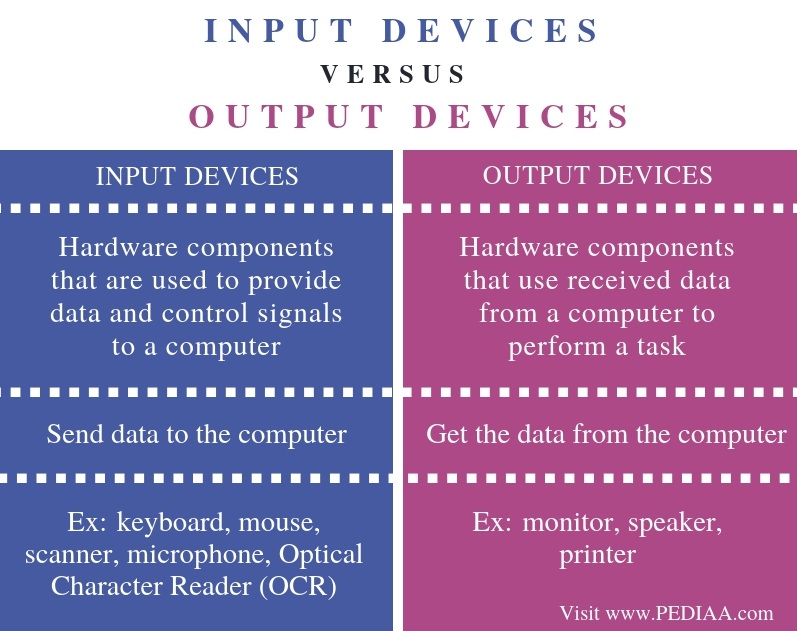
So, let’s recap this digital dance. Input devices are how you talk to your computer. They're your keyboard, mouse, microphone, and more. They send information in. Output devices are how your computer talks back to you. They're your monitor, speakers, printer, and so on. They send information out.
It’s a continuous loop! You input, the computer processes, and then it outputs the results. You see it on your monitor, hear it through your speakers, or print it on paper. Then, you might input a new command based on what you saw or heard. It’s a beautiful, never-ending conversation!
Think of it like ordering food at a restaurant. You input your order to the waiter (keyboard/mouse). The waiter takes it to the kitchen (processor). The chef prepares your meal, and then the waiter outputs it to your table (monitor/plate). You then input your 'thank you' or your request for more water. It’s all about sending and receiving information!
The beauty of technology is how seamlessly these devices work together to create our digital experiences. They’re the unsung heroes that make everything from browsing the web to playing complex games possible. So next time you’re using your computer, take a moment to appreciate these humble yet powerful tools that bridge the gap between you and the digital world.
And remember, whether you’re typing furiously, clicking with precision, listening to your favorite tunes, or marveling at a stunning image, you’re part of this incredible exchange. You’re not just a user; you’re a collaborator in the digital symphony. So go forth, input with gusto, and enjoy the wonderful outputs the world of technology has to offer. You’ve got this!