
How To Use A Green Screen On Premiere Pro

Ever watched your favorite movie or TV show and thought, "Wow, that looks so cool! How did they do that?" Well, get ready to unlock a bit of that magic right from your own living room. We're talking about the wonderful world of green screens, and trust me, it's way more fun and less scary than it sounds.
Imagine this: you're filming your epic adventure, maybe you're battling a dragon (or just trying to get your cat to pose). But instead of a boring old wall behind you, you've got a vibrant, almost ridiculously bright green backdrop. This isn't for a St. Patrick's Day party; this green is your ticket to anywhere!
The secret sauce that makes this whole thing work is a little piece of software called Adobe Premiere Pro. Think of it as your digital paintbrush, but instead of colors, it's making things disappear and reappear. It's the wizard's wand of video editing, and today, we're going to learn a simple trick it knows.
Making the Magic Happen
First things first, you need your star – that’s you, or your cat, or your epic dragon reenactment. And you need your green screen. Seriously, the brighter, the better. Think highlighter-pen bright. This makes it super easy for Premiere Pro to see what's green and what's not green.
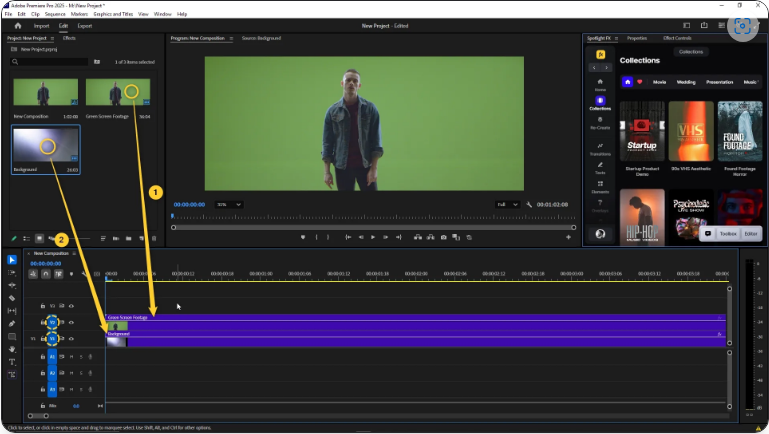
Once you’ve filmed your masterpiece against the green, you’ll import your footage into Premiere Pro. It’s like bringing all your toys to your playroom. You’ll have your green-screened clip, and then you’ll have the background you want to put behind it. This could be the surface of the moon, a bustling Parisian street, or even your grandma’s prize-winning garden.
Now, here comes the fun part. We're going to tell Premiere Pro to get rid of all that green. It’s like a magical eraser that only erases one specific color. You find a special tool, and with a few clicks, poof! The green disappears, leaving only you (or your cat) floating in digital space.

The Ultra Key Trick
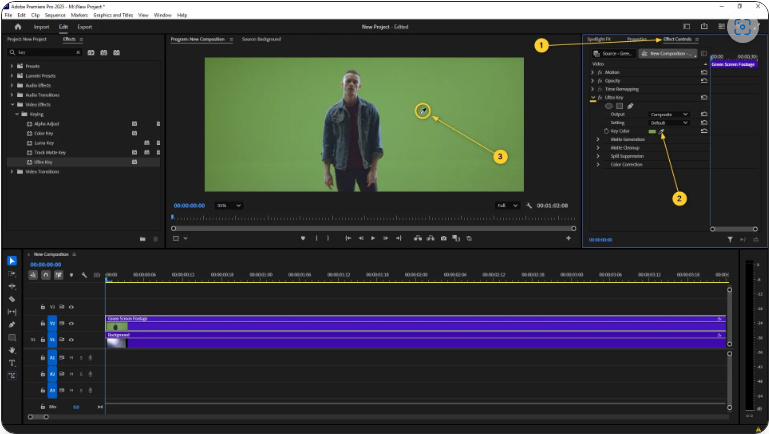
In Premiere Pro, the magic tool for this is usually called the Ultra Key. Don't let the fancy name scare you. It’s like a helpful robot that listens to your instructions. You just tell it, "Hey, Ultra Key, can you make all this green go away?" And it does!
You’ll drag this Ultra Key effect onto your green-screened video clip. Then, you’ll use a little eyedropper tool to click on the green. It’s like pointing and saying, "This color, please!" And just like that, the background vanishes.
The beauty of this is that it's surprisingly forgiving. Even if your green screen has a few wrinkles or some slightly different shades of green, Premiere Pro is pretty smart about figuring out what to remove. It’s like it has a built-in understanding of "green-ness."
Putting it All Together
Once the green is gone, you’ll see your background clip showing through. It’s like having a window open to another world. You can then adjust things to make it look seamless. Maybe you want to make your subject slightly bigger, or move them around a bit. Premiere Pro lets you do all of that.
The result? You could be standing on top of Mount Everest, waving your arms like you’ve just conquered it. Or maybe you're a tiny gnome standing next to a giant mushroom. The possibilities are literally endless, and they all start with that one simple effect in Premiere Pro.
Humorous Mishaps and Heartwarming Moments
Now, it’s not always perfect. Sometimes, you might get a faint green halo around your head. This is when you might need to tweak the settings a tiny bit. Think of it as a friendly challenge from your editing software.
I remember one time trying to film my dog on a green screen, hoping he'd look like he was flying. He spent the whole time trying to chew the green screen. The final video showed him looking like he was bravely soaring through the sky, but with a suspicious green string hanging from his mouth. We called it "The Flying Sausage of Doom."
On the other hand, I've seen people create the most heartwarming videos. Grandparents who can't travel can appear to be right there with their grandkids for birthdays, sitting on a beach or in a park they only dream of visiting. It bridges distances in a way that feels truly magical, all thanks to a bit of green fabric and Premiere Pro.
Beyond the Basics
What's amazing is how this technology has trickled down from huge Hollywood studios to your home computer. You don't need a million-dollar budget anymore. You just need a decent camera, a bit of green cloth, and the willingness to play around with Premiere Pro.
You can use it for anything. Want to pretend you're a news anchor reporting from a fake disaster zone (for comedic effect, of course)? Easy. Want to have a conversation with your favorite historical figure, brought to life with a stock photo? Totally doable.
The learning curve for Ultra Key in Premiere Pro is surprisingly gentle. You’ll be amazed at how quickly you can go from a regular video to something that looks professionally produced. It's an incredible tool for storytelling, adding a visual flair that can elevate any project.
Unleash Your Inner Spielberg
So, the next time you see someone seemingly teleporting across the screen, or interacting with fantastical creatures, remember the humble green screen and the powerful magic of Premiere Pro. It’s not about being complicated; it’s about opening up a world of creative possibilities.
Don't be afraid to experiment. Try different backgrounds. Put yourself in absurd situations. Make your cat the star of an intergalactic opera. The only limit is your imagination, and Premiere Pro is there to help you bring those wild ideas to life.
It’s a way to add a little extra wow to your videos, to surprise your friends, and maybe, just maybe, to feel like a true visual effects artist. So grab that green screen, dive into Premiere Pro, and start creating your own little slice of cinematic wonder. You might just surprise yourself with what you can achieve!